Once orders start coming in, the operational reality kicks in.
Where do they go? How do you know who paid? What about returns, reviews, repeat customers?
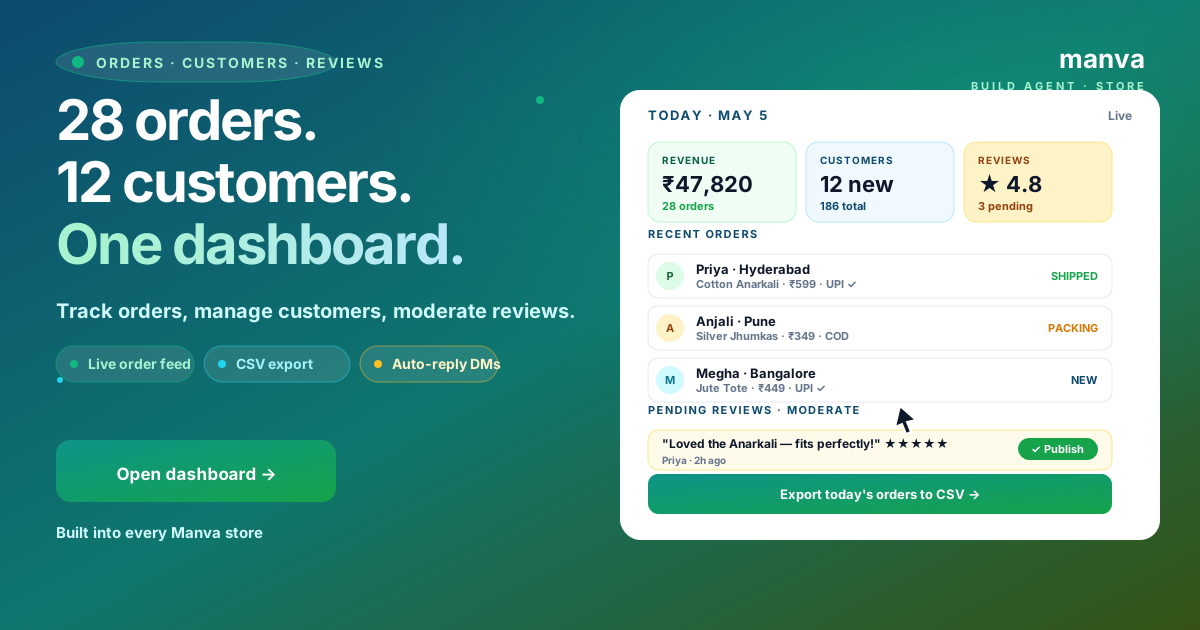
Manva consolidates orders, customers and reviews into one dashboard. This guide walks through the workflow.
Orders tab
Manva → Orders. Live feed sorted by newest. Each order shows:
- Customer — name, city, repeat-buyer flag
- Items + total — products, quantity, line total, discounts
- Payment — UPI/Card/COD status (Razorpay-synced)
- Shipping — Shiprocket tracking + courier
- Status — New → Packing → Shipped → Delivered
One-click actions: print label, mark packed, mark shipped, send tracking SMS, refund.
Customers tab
Every order auto-creates a customer record. The list shows lifetime value, # of orders, last order date, channel (org/IG/WA), and repeat probability.
| Filter | Use |
|---|---|
| VIP (3+ orders) | Early access broadcasts |
| Last 30 days | Cross-sell campaigns |
| Lapsed (90+ days) | Win-back broadcasts |
| High-AOV | Premium product launches |
Reviews tab
Customers can leave reviews on product pages. Manva queues them for your approval before they go public — protects against spam and competitor sabotage.
Three actions: Publish · Reply (private) · Hide. The first two should happen within 24 hours.
The dashboard is included on every Manva store
From ₹999 one-time. Razorpay + Shiprocket synced live.
Build a storeOperational habits that compound
- Pack orders 9-11 AM IST daily — beats afternoon rush, more reliable for courier pickup
- Send personal "thanks for ordering" WhatsApp within 1 hour — repeat-rate doubles
- Export weekly — Settings → Export → CSV. Keeps an offline backup of orders/customers
- Reply to reviews same day — moderation queue should never have items 24h+ old
- Mark "delivered" promptly — triggers a review-request email automatically (more reviews = better SEO)
Common mistakes
1. Letting orders pile up unpacked
Indian buyers complain on social if delivery slips. Pack daily.
2. Not exporting backups
Cloud is reliable but a CSV in your Drive once a week is cheap insurance.
3. Auto-publishing all reviews
Spam reviews, competitor 1-star sabotage. Always moderate.
4. Ignoring repeat customers
VIPs (3+ orders) drive 30-50% of revenue. Treat them differently.
FAQ
Manage your store from one dashboard
Orders + customers + reviews + Razorpay + Shiprocket. Built into every ₹999 Manva store.