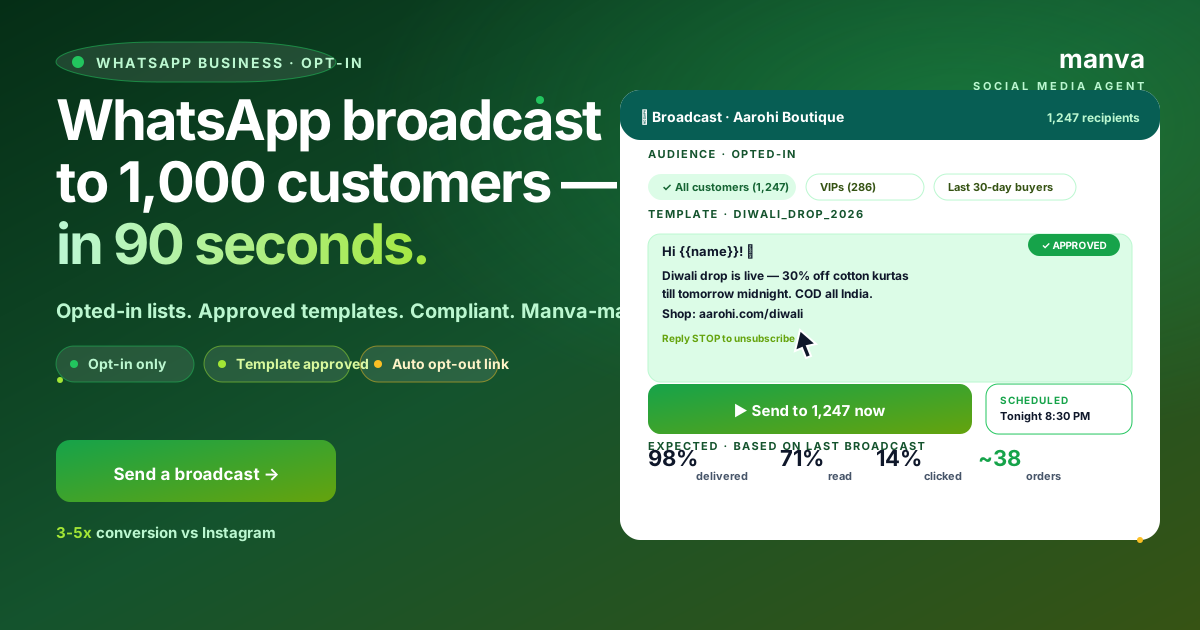
WhatsApp is the highest-engagement channel most Indian businesses have access to — but it is also the easiest to mess up. Send the wrong thing to the wrong list and your business number gets restricted within hours. This guide covers how to use Manva's WhatsApp broadcast tool the right way: opt-in only, template-first, and compliance-aware.
What "WhatsApp broadcast" actually is
A broadcast is a single message sent individually to many recipients — not a group chat. Recipients see the message as a one-to-one conversation from your business number; they do not see other recipients.
Manva's broadcast feature is for WhatsApp Business API numbers (also called Cloud API) — the official Meta product for businesses, not the regular WhatsApp Business app. The Business API supports sending at scale, message templates, opt-in tracking, and delivery reporting.
If you do not have a WhatsApp Business API number yet, the WhatsApp Marketing India guide covers how to get one — it takes 1–3 days.
The single rule that matters: opt-in
WhatsApp's policy is strict and Manva enforces it:
- You can only send marketing messages to people who have opted in to receive them
- Opt-in must be explicit (a checkbox at checkout, a "yes I want updates" reply, a contact-form consent)
- You must offer a way to opt out (Manva auto-handles this)
People who have not opted in can still receive utility and transactional messages (order confirmations, delivery updates, OTPs) but not marketing messages.
Sending marketing messages to scraped numbers, purchased lists or contacts who never opted in is the fastest way to get your number flagged. Even one or two recipients hitting "Block" + "Report" can trigger Meta's rate limiting.
Step 1: Build your opt-in list
The list of recipients comes from one of these sources:
| Source | How they opted in |
|---|---|
| Storefront subscribers | Ticked the WhatsApp consent box at checkout |
| Contact-form leads | Form had a "Send me updates on WhatsApp" checkbox |
| Manual import | You collected the consent offline (e.g. in-store sign-up) |
| Reply-to-opt-in | Replied YES to your initial opt-in message |
In Subscribers → WhatsApp, every entry shows when and how they opted in — the audit trail Meta requires if your account is ever reviewed.
Step 2: Use approved templates for marketing
WhatsApp's rules say marketing messages must use a pre-approved message template. You build one inside Manva, submit it for approval, and once Meta approves it (usually within minutes to a few hours), you can send broadcasts using it.
A template typically has:
- A header (text or image)
- A body with placeholders like {{1}}, {{2}} for personalisation
- An optional footer
- Optional buttons (call-to-action or quick-reply)
Manva's template builder shows you the rules in real time — character limits, button limits, placeholder rules — so you do not submit something that gets rejected.
Step 3: Compose the broadcast
From the dashboard: WhatsApp → Broadcasts → New broadcast.
- Pick the template — choose from your approved templates
- Pick the audience — entire opt-in list, or a tag-based segment (e.g. "everyone who bought in the last 60 days")
- Personalise placeholders — for {{1}} use "first name", for {{2}} use "last order number", etc. Manva pulls these from your customer database automatically
- Schedule — send now, or pick a date and time
Before sending, the composer shows you:
- Total recipients
- A preview of how the message will look on the recipient's phone
- The estimated WhatsApp conversation cost (Meta charges per conversation; rates vary by category and country)
Step 4: Send and monitor
Once sent, the broadcast queue processes recipients. The dashboard shows live counters:
- Sent — handed off to WhatsApp for delivery
- Delivered — landed on the recipient's phone
- Read — opened by the recipient
- Replied — recipient replied to your message
- Failed — could not be delivered (number invalid, blocked you, etc.)
Each individual recipient is logged with the delivery status. If 5–10% of recipients fail, that is normal (number changes, blocks, etc.). If 30%+ fail, your list is stale and needs cleanup.
Step 5: Handle replies
When recipients reply to a broadcast, the conversation moves to your Inbox. From there you can:
- Reply manually
- Use a saved reply (one-tap responses for FAQs)
- Hand off to a team member
- Tag the customer ("interested", "buying soon", "needs follow-up")
Replies are gold — they are the highest-intent leads you will ever generate. Treat them like phone calls, not like emails.
What gets your account restricted
In order of severity:
- High block rate — recipients tap "Block" + "Report" en masse. Caused by sending to people who did not opt in.
- Low quality rating — Meta tracks how often recipients react negatively. Drops your sending tier.
- Sending without templates — sending marketing messages outside the 24-hour customer service window without a template.
- Misuse of utility templates — using an "order confirmation" template to send marketing content. Templates are category-locked.
Manva blocks the obvious mistakes (you cannot send to non-opted-in numbers, you cannot send marketing without a template), but you still need to keep your list clean and your messages relevant.
Best practices
- Send relevant content. A jewellery boutique broadcasting about a saree sale is irrelevant — recipients will tune out.
- Send infrequently. Weekly is usually enough. Daily is too much.
- Personalise. Use the customer's name, mention their last purchase, refer to their city. Generic broadcasts perform worst.
- Respect time zones. Do not broadcast at 11pm or 7am — even if technically allowed, it annoys recipients.
Frequently asked questions
Can I broadcast to a group chat? No — that is a different feature and is not how the Business API works. Manva only supports one-to-one broadcasts to opt-in recipients.
What does it cost? Meta charges per "conversation" (24-hour window per recipient). Rates differ by template category — utility templates are cheaper than marketing templates. See Meta's WhatsApp pricing page for current rates.
Can I attach images? Yes — templates support image headers, document headers, and video headers. Submit them as part of the template approval.
What if a recipient replies STOP? Manva auto-detects opt-out keywords (STOP, UNSUBSCRIBE, REMOVE) and removes them from your list. They never get future broadcasts.
WhatsApp broadcast is the highest-leverage channel an Indian business has — done right, it converts at 5–10× the rate of email. Done wrong, you lose the channel entirely. Manva is built so the right path is the easy one.