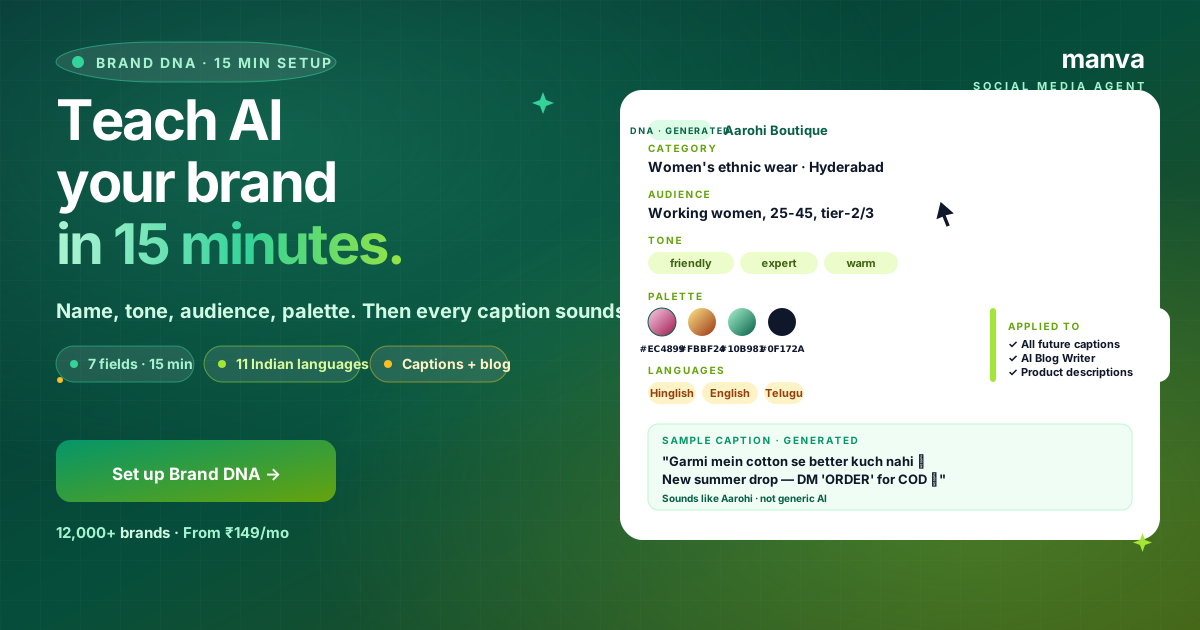
Generic AI captions are easy to spot. They're also easy to ignore.
Brand DNA fixes both problems. It's the single setting that turns Manva's AI from a "decent caption generator" into something that sounds like your brand.
15 minutes of setup. Permanent benefit on every caption, blog and product description after.
Why Brand DNA matters more than any other Manva setting
Without Brand DNA, AI defaults to "average Indian SMB" voice. Friendly enough, but blends into every other AI-generated post.
With Brand DNA set, the AI:
- Picks vocabulary your audience uses — Hyderabadi cotton-suit buyers vs Mumbai athleisure buyers don't read the same words.
- Matches your tone — friendly + expert vs cheeky vs premium-only vs aspirational.
- Uses your palette in graphics — auto-generated thumbnails, ad creatives, blog hero images all pull from your colors.
- Speaks your buyer's language — Hindi, Tamil, Hinglish or English, based on where most of your buyers live.
Across 12,000+ Manva accounts, brands that complete Brand DNA see ~40% higher engagement on AI-generated posts than brands that skip it.
The 7 fields, explained
1. Brand Name
Exactly as you want it to appear. Case matters. "Aarohi Boutique" not "aarohi boutique."
2. Category
Specific beats general. "Hand-block cotton kurtas, Hyderabad" beats "Fashion."
3. Audience
Who buys, in one line. "Working women 25-45 in tier-2/3 cities, ₹500-1500 price band."
4. Tone (3 keywords)
Pick 3 from: friendly, expert, witty, premium, warm, cheeky, professional, aspirational, casual. The combination is the differentiator. "Friendly + expert + warm" reads very different from "premium + aspirational + cheeky."
5. Color Palette
3-5 hex codes. Manva extracts these from your logo if you upload one, or you pick from presets.
6. Primary Language
The language your captions and content default to. You can still override per-post. Pick based on where most of your buyers live, not where you live.
7. Voice Samples (optional but powerful)
Paste 2-3 of your past best captions or product descriptions. AI learns your patterns — emoji style, sentence length, hashtag mix — and replicates them.
Manva → Settings → Brand DNA → Start. Available on every plan, free or paid.
The setup wizard appears. Takes about 15 minutes; you can save and resume.
Move through them in order. The most thoughtful field is Audience — the more specific, the better the output.
For Voice Samples, pick captions that:
- Got the most engagement (saves, comments, shares — not just likes)
- Sound like you, not a template
- Are recent (your tone in 2026 isn't your tone from 2022)
Click Generate Preview. AI returns 3 sample captions in your DNA — one product post, one social proof post, one educational post.
Read them out loud. If they sound like your brand, click Save DNA. If something feels off, tweak the tone keywords or audience field and regenerate. Most users land it within 2 attempts.
Once saved, DNA is applied to every future AI generation — across the Composer, Blog Writer, Product Description Generator, ad copy, and email templates.
Brand DNA is included free on every plan
Manva's Social Media Agent — Hindi/Hinglish AI, IST scheduling, festival calendar, Brand DNA. From ₹149/month with a 7-day free trial.
Try free for 7 daysBefore/after — same product, different DNA
Without Brand DNA (default AI tone)
"Beautiful cotton kurta available now. High quality. Free shipping. Order today."
With Brand DNA: friendly + expert + warm, Hyderabad audience, Hinglish
"Garmi mein cotton se better kuch nahi 🌿 Hyderabad ki summer ke liye made — light, breathable, COD pan-India. DM 'ORDER' ✨"
With Brand DNA: premium + aspirational, Mumbai audience, English
"Hand-block printed in Jaipur. 180 GSM organic cotton. Designed for the way Mumbai women actually live. Free pan-India shipping."
Same product. Three different DNAs. Each one resonates with its specific audience.
Common mistakes
1. Vague tone keywords
"Professional + good + nice" produces bland output. Be opinionated — pick 3 keywords that distinguish your brand from competitors.
2. Skipping Voice Samples
Voice Samples is the field that makes the AI sound like you specifically. The first 2-3 minutes of pasting samples saves hours of editing later.
3. Using your language preference, not your buyer's
If your buyers are in Patna and you write in English, your DNA should still be Hindi/Hinglish. Match the audience, not your comfort zone.
4. Setting it once and never updating
Update Brand DNA every 6-12 months as your brand evolves. New product line, new audience tier — each shift deserves a tweak.
5. Multiple sub-brands sharing one DNA
If you run two distinct brands (e.g. Aarohi Ethnic + Aarohi Active), use two Brand DNAs. Available on Business and Agency plans.
FAQ
Set up Brand DNA in 15 minutes
Free on every Manva plan. Makes captions, blog posts, product descriptions and ad copy sound consistently like your brand.