Shipping is the second most expensive thing on an Indian online order. After the product itself.
Get it wrong and your margin disappears. Get it right and you ship more, refund less, and customers come back.
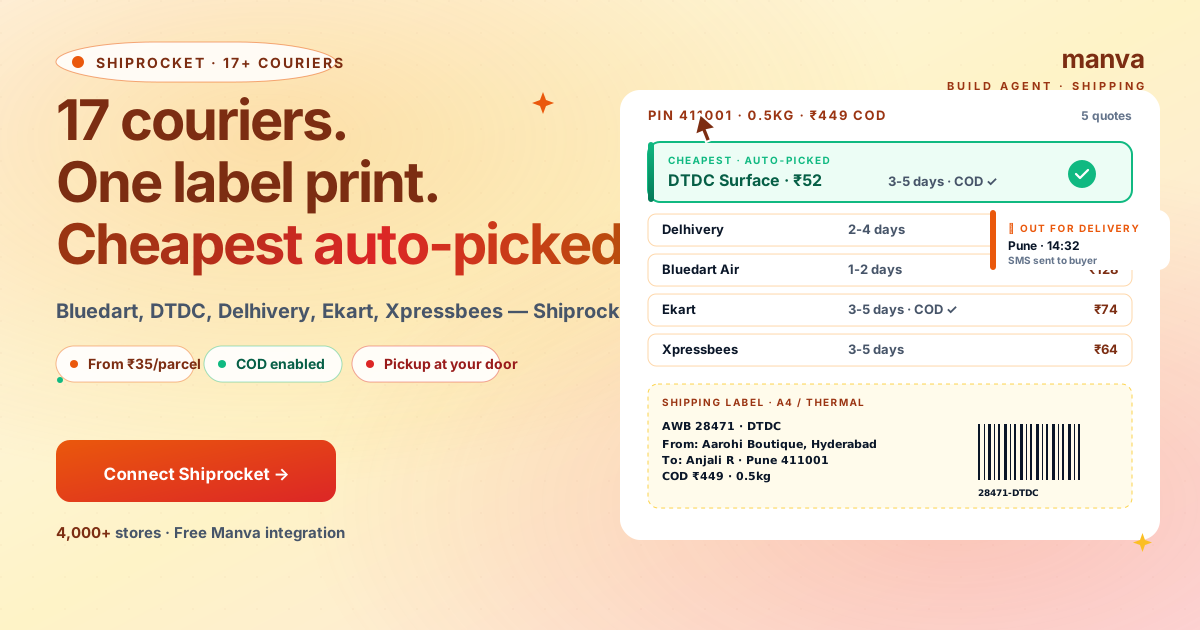
Shiprocket is built into Manva. 17+ couriers compared per pin code, cheapest auto-picked, COD enabled. Setup is 90 seconds. This guide covers the full flow: connect, pack, ship, track, return.
Why Shiprocket vs direct courier accounts
Three reasons Shiprocket beats opening Bluedart/Delhivery accounts directly:
- Volume pricing without the volume. Shiprocket negotiates bulk rates and passes them to small sellers. A 0.5kg parcel from Hyderabad to Pune costs ~₹52 via Shiprocket DTDC; the same direct from DTDC retail is ~₹110.
- One dashboard for 17 couriers. No separate account, KYC, or contract per courier. You see all quotes side by side and pick.
- COD remittance handled. Shiprocket collects COD from couriers and remits to your bank in 7-10 days. You don't chase couriers.
Manva → Settings → Shipping → Connect Shiprocket. Two paths:
- Existing Shiprocket account — log in with email/password. Done.
- New account — Manva sends you to shiprocket.in. Sign up free (no credit card). Add bank for COD remittance. Return to Manva and click Connect again.
Shiprocket activates immediately. You can ship the first parcel within minutes.
Order comes in. Manva → Orders → click the order → Generate Label.
Shiprocket compares 17+ couriers for that buyer's pin code. The cheapest one is auto-picked. You can override (e.g. pick Bluedart Air for express) if you want.
Click Print Label. Two formats:
- A4 — regular printer. One label per page.
- 4x6 thermal — for thermal label printers. Faster, no ink, ₹3,000-5,000 one-time printer cost.
Stick the label on the parcel. Done.
Click Schedule Pickup. Shiprocket dispatches the courier to your address — usually same-day if booked before 1 PM IST, next day otherwise.
You don't drop the parcel anywhere. The courier comes, scans, and takes.
Pickup is free for prepaid orders, ₹15-25 added to COD orders.
The buyer gets:
- SMS with the AWB (tracking number) and link
- Email with the same
- WhatsApp update at out-for-delivery (if you've enabled the WhatsApp Business integration)
You see the same updates in Manva → Orders → click the order → Tracking tab.
For returns
Order page → Return → Generate Reverse Pickup Label. Send the buyer the AWB. Shiprocket schedules the pickup. Once the parcel reaches your address, mark it Received in Manva and process the refund.
Don't have a Manva store yet?
Build a store with Razorpay + Shiprocket built-in for ₹999 one-time. UPI, COD, custom domain, blog. No monthly fee.
Build a storeShipping costs by zone
Approximate prices for a 0.5kg parcel via Shiprocket's typical carriers in 2026:
| Zone | Surface (DTDC/Ekart) | Express (Bluedart Air) | COD fee |
|---|---|---|---|
| Same city / intra-zone | ₹35-45 | ₹85-110 | +₹15 |
| Same state | ₹45-60 | ₹110-140 | +₹20 |
| Adjacent state | ₹55-75 | ₹130-170 | +₹20 |
| Pan India | ₹65-95 | ₹150-200 | +₹25 |
| North-East / J&K | ₹95-140 | ₹220-300 | +₹30 |
Add GST (18%). Heavier parcels: rates scale roughly linearly per 500g.
Common mistakes
1. Picking Bluedart Air for low-margin orders
Bluedart Air is fast (1-2 days) but 2-3x the cost. For a ₹449 cotton kurta with 30% margin, Bluedart eats your margin. Stick with surface unless the buyer pays a fast-shipping fee.
2. Underweighing parcels
Declare the actual weight (with packaging). Underweighing causes Shiprocket to auto-charge the difference later — and in some cases triggers manual reweighing fees that double the shipping cost.
3. Not enabling COD
COD is 35-50% of orders for tier-2/3 audiences. Disabling it (because you fear non-acceptance) kills half your revenue. Better: enable COD, accept some risk, and use Shiprocket's "Risk Score" to auto-block high-risk pin codes.
4. Skipping the WhatsApp tracking integration
WhatsApp tracking SMS reduces "where is my order?" support tickets by 60-80%. Enable it in Manva → Settings → Notifications → WhatsApp.
5. Not buying shipment insurance for fragile / high-value items
Default Shiprocket insurance covers up to declared value. For items over ₹5,000 (electronics, fine jewellery, glass), opt into the premium plan for an extra ₹15-30/shipment.
FAQ
Build a Manva store with Shiprocket built-in
₹999 one-time. UPI via Razorpay, COD via Shiprocket, custom domain, blog, SEO. No monthly fee.